QField blog

QField_RC5

QField RC5 - Last call for testing

We are really happy to announce the fifth and (hopefully) last 1.0 release candidate in QField’s history! This means that QField 1.0 is closer than ever. Get it while it’s hot on the Playstore ( https://qfield.org/get) or on GitHub Thanks to all the feedback by the fantastic community we were able to fix plenty of bugs, address performance issues and even add some super cool new features. Among the new features, the most important is the flashy new file selector with favorite directories (long press on a folder to add it to the favorites and longpress on the favorites list to remove it) and an automatic list of the last three opened projects that will save you heaps of time while looking for your projects. ...

March 14, 2019 · 2 min · mbernasocchi
QField_RC3

You gave us feedback - we give you QField 1.0 RC3

We are really happy to announce the release a new great milestone in QField’s history, QField 1.0 Release Candidate 3! (Yes, you might have got a glimpse of the broken RC2 if you where very attentive) Thanks to the great feedback we received since releasing RC1 we were able to fix plenty of issues and add some more goodies. We would like to invite everybody to install this Release Candidate and help us test it as much as possible so that we can iron out as many bugs as possible before the final release of QField 1.0. ...

January 31, 2019 · 2 min · mbernasocchi
QField_RC

New Year's present - QField 1.0 RC1

It was a long and winding road but we are very excited to announce the general availability of QField 1.0 Release Candidate 1. Packed with loads of useful features like online and offline features digitizing, geometry and attributes editing, attribute search, powerful forms, theme switching, GPS support, camera integration and much more, QField is the powerful tool for those who need to edit on the go and would like to avoid standing in the swamp with a laptop or paper charts. ...

January 8, 2019 · 2 min · mbernasocchi
QField_RC

New Year's present - QField 1.0 RC1

It was a long and winding road but we are very excited to announce the general availability of QField 1.0 Release Candidate 1. Packed with loads of useful features like online and offline features digitizing, geometry and attributes editing, attribute search, powerful forms, theme switching, GPS support, camera integration and much more, QField is the powerful tool for those who need to edit on the go and would like to avoid standing in the swamp with a laptop or paper charts. ...

January 8, 2019 · 2 min · mbernasocchi
modeller

How to filter features in QGIS using the graphical processing modeler

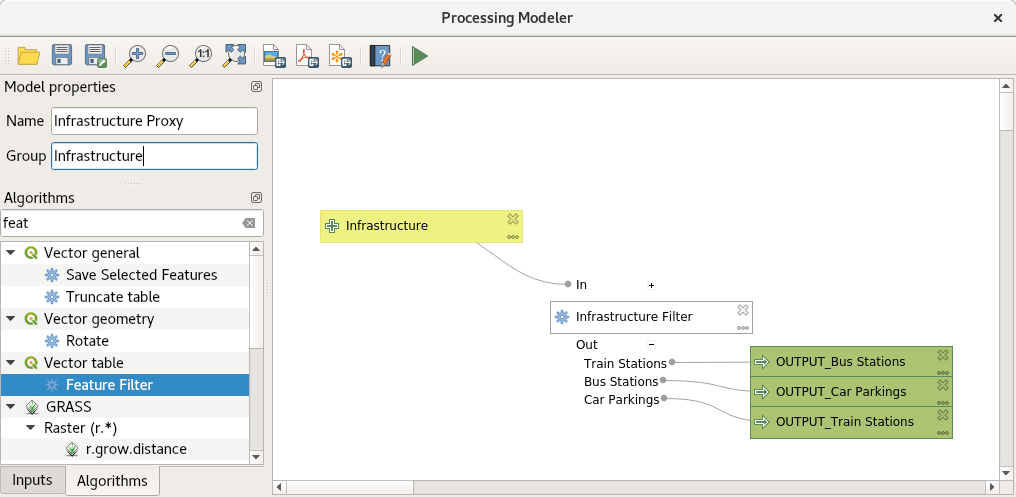
This article describes a new algorithm for the processing modeler called feature filter algorithm. If you are already familiar with ETL concepts and the graphical modeler, you can directly jump to the section the feature filter algorithm. Building workflows for repetitive tasks When building workflows for simple or complex geodata infrastructures, one of the most common tasks one encounters is to extract some of the features and copy them to another destination. Sometimes they need to be modified and a few attributes calculated or deleted, maybe even the geometry needs to be adjusted or in some fancy situations one even wants to generate a couple of objects from one input object. This process is often called ETL (Extract, Transform, Load) and it is something that is worth mastering as a GIS expert. Let’s imagine a situation where we sent a field worker out to collect information about public infrastructure, equipped with a brand-new tablet and the latest and greatest version of QField. To make his task super easy, we prepare one single layer for him with an attribute type which can be set to Bus Station, Car Parking or Train Station. Now back in the office we want to integrate this back into our spatially enabled database which has been designed with 3 target tables. ...

May 28, 2018 · 5 min · mkuhn

PostgreSQL back end solution for quality assurance and data archive

Did you know that the possibilities to make a full QGIS back end solution for quality assurance and archiving in PostgreSQL are immense? SQL has it’s well known limitations, but with a little bit creativity you can make quite nice solutions just using triggers and rules. In this post I’ll explain what we did lately based on a project with a customer. He needed to assure the consistency of data but still give his employees the possibility of a fast feeding of the data collected on the field to the database. Another request was to keep every status of the data with the information about the changes (archiving). It’s always the question, where to put the logical part of the solution. QGIS is quite powerful with constraints, but the undeniable advantage of a back end solution is, that you can use any front end - no matter what configuration you have on QGIS or what Feature Manipulation Engine (FME) you use - without influencing the guarantee of data validity. ...

January 8, 2018 · 13 min · signedav

QField for Android 5

QField app on Google Play QField Karma edition app on Google Play It’s done, finally we managed to get rid of Ministro so that we finally can say, QField runs on any android from 4.0.3 (ICS). This makes as of today (according to google) 96% of the android installations worldwide. Eventually we want to settle to 4.3 (JB) as minimum to allow us using certain features and avoiding one known issue, but for now it would mean cutting of another 25% of the users. So as of today it is: 4.0.3 (Ice cream sandwich API 15) is the required minimal Android version to run QField and Android 4.3 (Jelly Bean API 18) is the suggested minimal version. We tested with 4.4, 5.0.1 and 5.1 but we haven’t had the chance to get our hands on an Android 6 so if you can, let us know how it works. But adding support for android 5 isn’t the only great news, during the process we also: ...

December 1, 2015 · 2 min · mbernasocchi

QField in the wild

QField app on Google Play QField Karma edition app on Google Play QField Experimental is out, after a couple of months of requirements gathering, private early alpha testing and foremost tons of emails requesting access to the testes group we decided today to put the current BETA version in the playstore. This means that from now on you can install QField just like any other android app by using the playstore. It is important to remember that QField is still beta and thus it doesn’t have all the features we want yet. Notably, there is no digitizing, due to a bug in android, Android 5 (Lollipop) is currently not supported (android 4.3 and 4.4 are suggested) and for now you need to manually copy the projects and data from the desktop to your device. QField is an Open Source project led by OPENGIS.ch LLC, more information, the source code and a possibility to donate to the project can be found on the QField page (preferred) or by buying the QField for QGIS Karma edition app. Also if you need a specific feature, contact us to sponsor its development.

June 15, 2015 · 1 min · mbernasocchi

A star is born, QGIS mobile is now QField

It is with great pleasure that we want to announce the new name for what was briefly known as QGIS mobile. Please welcome QField for QGIS™! After long thinking about various names and variants including QGIS mobile, QTouch, OPENGIS.ch QGIS mobile, QWork, and many more, we felt that QField represents best what we want to archive. A field data capture and management app fully compatible with QGIS™. QField allows you to take your QGIS projects out of the office for effective field work. By maintaining QGIS’ styling and edit widgets QField greatly reduces preparation time. QField is an Open Source project led by OPENGIS.ch LLC with the whole development happening on Github. Currently we are running an invite-only alpha testing but as soon as the app will have a bit more functionality we will widen up the testers group. QField will be released for free on the Playstore with the possibility of donating to the project via paypal (preferred) or by buying the QField for QGIS Karma edition app. Another way to greatly help the project is, if you need a specific feature, contact us to sponsor its development. QField is built from ground up to be touch oriented and easy to use outside and follows the following paradigm: ● GPS centric ● QGIS desktop compatible ● Fully working when offline ● Synchronization capabilities ● Project preparation on desktop ● Few and large buttons ● Switchable use paradigm (Display, Digitizing, Measuring, Inspection,…) QField is built using Qt5, QtQuick 2 (both are supported and suggested by Qt) and OpenGL so it is future proof and it spearheads QGIS towards Qt5. For feature requests, please contact us For bug reports contact us or better file an issue on Github
January 28, 2015 · 2 min · mbernasocchi

QGIS Mobile 0.2 Demo

QField (formerly known as QGIS Mobile) is a touch optimized interface for field work developed by OPENGIS.ch. It is with great pleasure the we want to share with you the demo video of version 0.2. Since the project is going to be one of our core projects, we set up a dedicated page here. The QGIS mobile 0.2 video demonstrates some basic functionality like navigation, feature identification and attribute editing. The performance is affected by android’s video recording software. In reality animaitons look fluent and the interface feels snappy. Demo performed on a Galaxy Note 8.0 with Android 4.4.4 (CM11).

January 11, 2015 · 1 min · mbernasocchi

QField is the leading professional fieldwork app used in enterprise settings for efficient geospatial data collection and management. As a Digital Public Good, QField not only excels in enterprise and professional applications but also contributes significantly to advancing at least six of the United Nations Sustainable Development Goals (SDGs), promoting a more sustainable and equitable future.

Stay in the loop

Subscribe to our newsletter and stay up to date on the latest and greatest!

Open-source

QField is released under the GNU Public License (GPL) Version 2 or above. Developing QField under this license means that you can inspect and modify the source code and guarantees that you will always have access to a QGIS based field data collection app that is free of cost and can be freely modified.

Privacy

View the QField Privacy Policy to learn what information is collected, used and how we protect this.

Credits

QField, QFieldCloud and QFieldSync are developped by OPENGIS.ch. OPENGIS.ch offers consulting, development, training and support for open-source software including QField, QGIS and PostGIS.